macOS Sonoma+ · Native Apple frameworks · No drivers

Your Mac's audio
finally under control.

Per-app volume, 10-band EQ, multiband compressor, peak limiter, stereo widener, and per-app recording. All from your menu bar. Built natively on macOS. No kernel extensions. No virtual drivers.

7-day full-featured trial · No credit card · ~500 KB download
🎵 App
⚙️ SoundPrism
Speakers
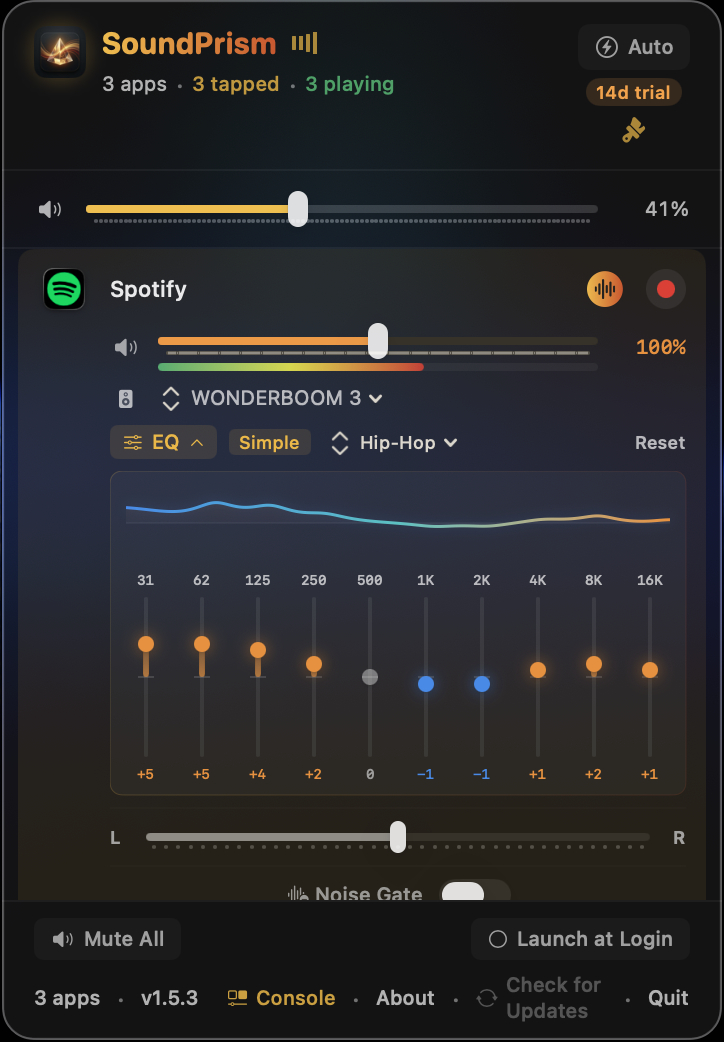
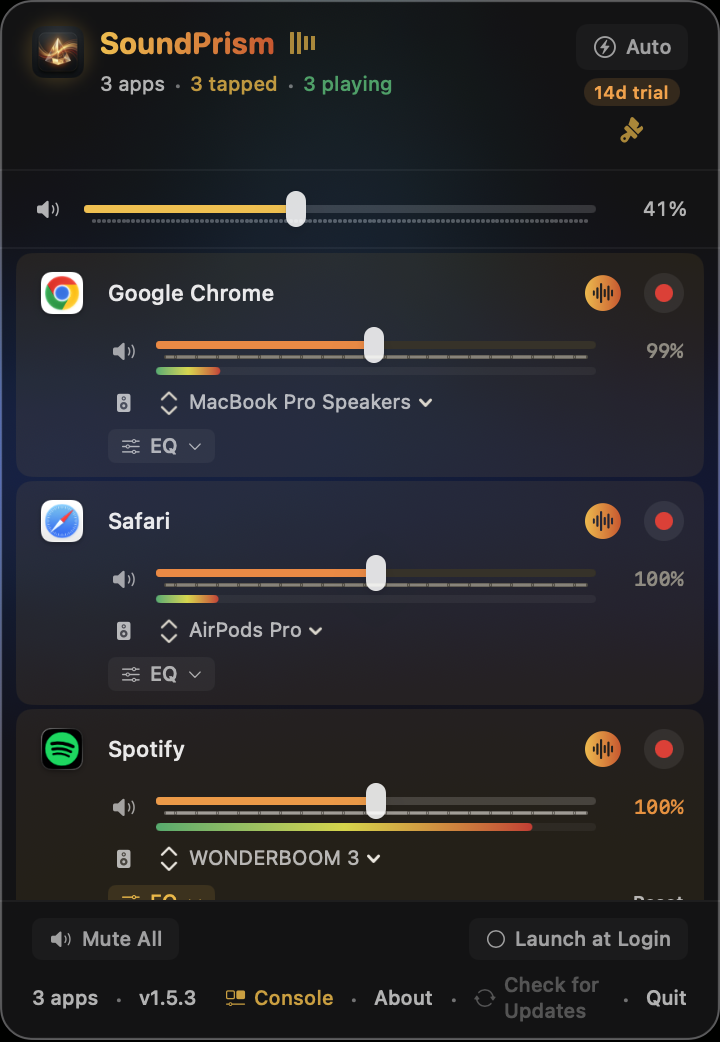
SoundPrism popover showing per-app volume controls for Chrome, Safari, and Spotify with individual output routing

The Problem

macOS gives you a single system volume slider. That's it.

  • Discord drowning out your music
  • Notification chimes blasting during meetings
  • No per-app EQ, dynamics, or audio processing
  • No way to record a single app's audio
  • Other tools require installing system drivers

The Solution

SoundPrism gives every app its own audio controls.

  • Individual volume for every app, 0% to 200%
  • Per-app EQ, compressor, limiter, and stereo effects
  • Route any app to any output device simultaneously
  • Dual-stream recording: original + processed audio
  • No drivers. No reboots. No kernel extensions.

Everything a sound engineer
would expect.

From quick volume tweaks to professional signal processing, SoundPrism scales to how you use it.

Essentials
🎚️

Per-App Volume

Individual volume sliders for every running app. Boost quiet apps to 200% or duck noisy ones to a whisper. Real-time VU meters show actual audio levels.

🔀

Output Routing

Send Spotify to your headphones, Zoom to your speakers, and a game to your monitor, all at the same time. Each app gets its own output device.

💾

Quick Configs

Save your entire mixer state (volumes, EQ curves, effects, routing) as named profiles. Switch between "Work," "Music," and "Gaming" setups instantly with ⌘⇧1-9.

SoundPrism popover with 10-band EQ expanded, showing Hip-Hop preset applied to Spotify
Per-app EQ — right from the popover
Pro Audio
🎛️

10-Band Parametric EQ

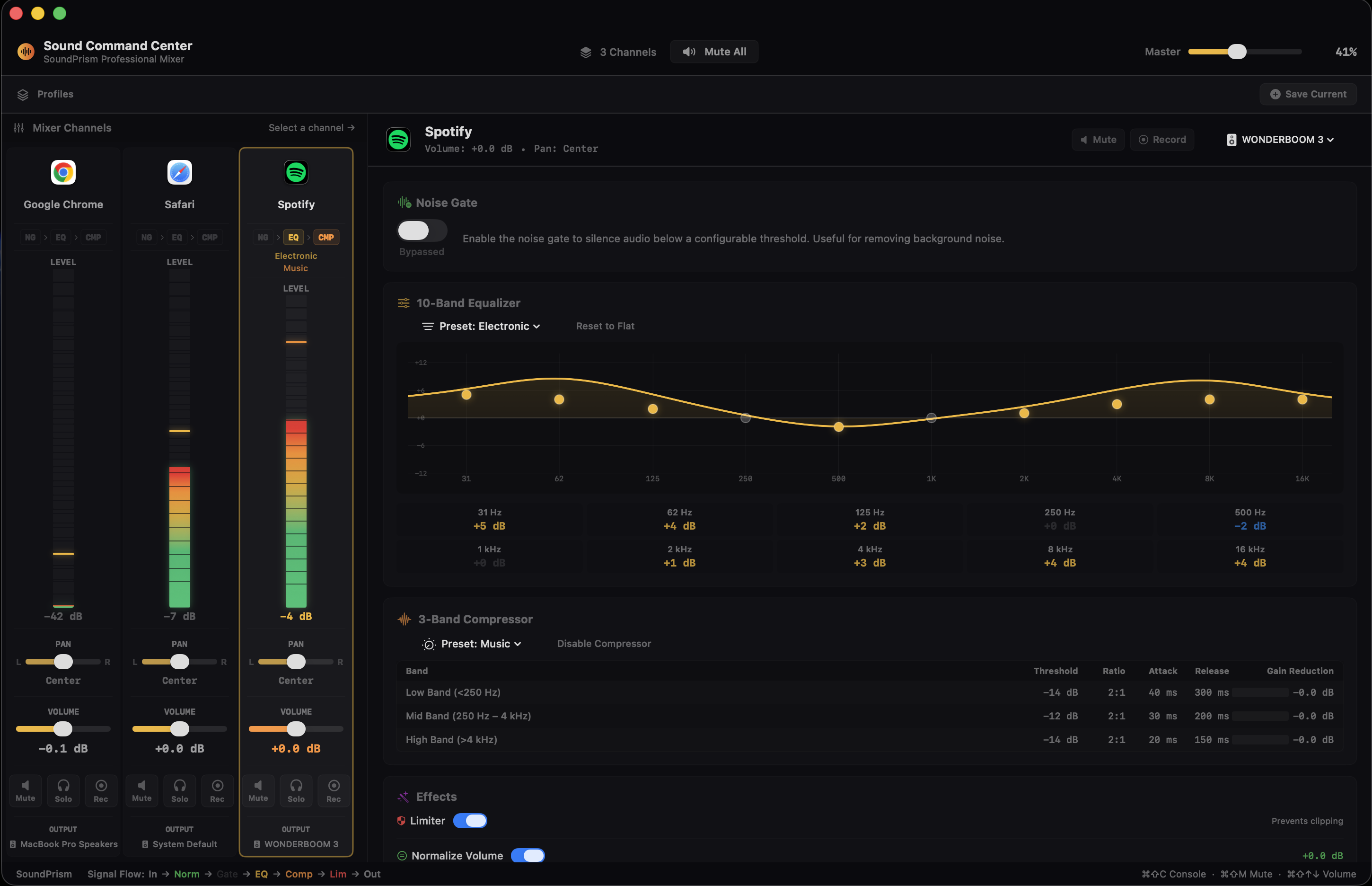
Shape any app's frequency response with precision. Simple 3-band mode for quick tweaks, or full 10-band ISO frequencies (31 Hz–16 kHz) for detailed sculpting. ±12 dB per band.

Hardware-accelerated · 8 named presets · zero added latency
📊

Multiband Compressor

Professional multiband dynamics processor with per-band controls. Threshold, ratio, attack, release, and makeup gain. 6 presets from Gentle to Broadcast.

Studio-grade processing · per-band gain reduction meters
🔇

Noise Gate

Cut background noise from any app. Adjustable threshold with smooth fade transitions for artifact-free gating. Per-app, real-time gate status.

Smooth fade transitions · no artifacts · per-app
Audio Effects
🛡️

Peak Limiter

Brick-wall protection against clipping. Intelligent transient detection prevents distortion before it happens. Prevents output from ever exceeding 0 dBFS.

Intelligent transient detection · optimized math · zero added latency
📏

Volume Normalization

Automatic loudness matching using the same standard as Spotify and YouTube. Quiet podcasts and loud music play at consistent levels without manual adjustment.

Smooth automatic gain · hardware-accelerated · transparent
🔊

Stereo Widener

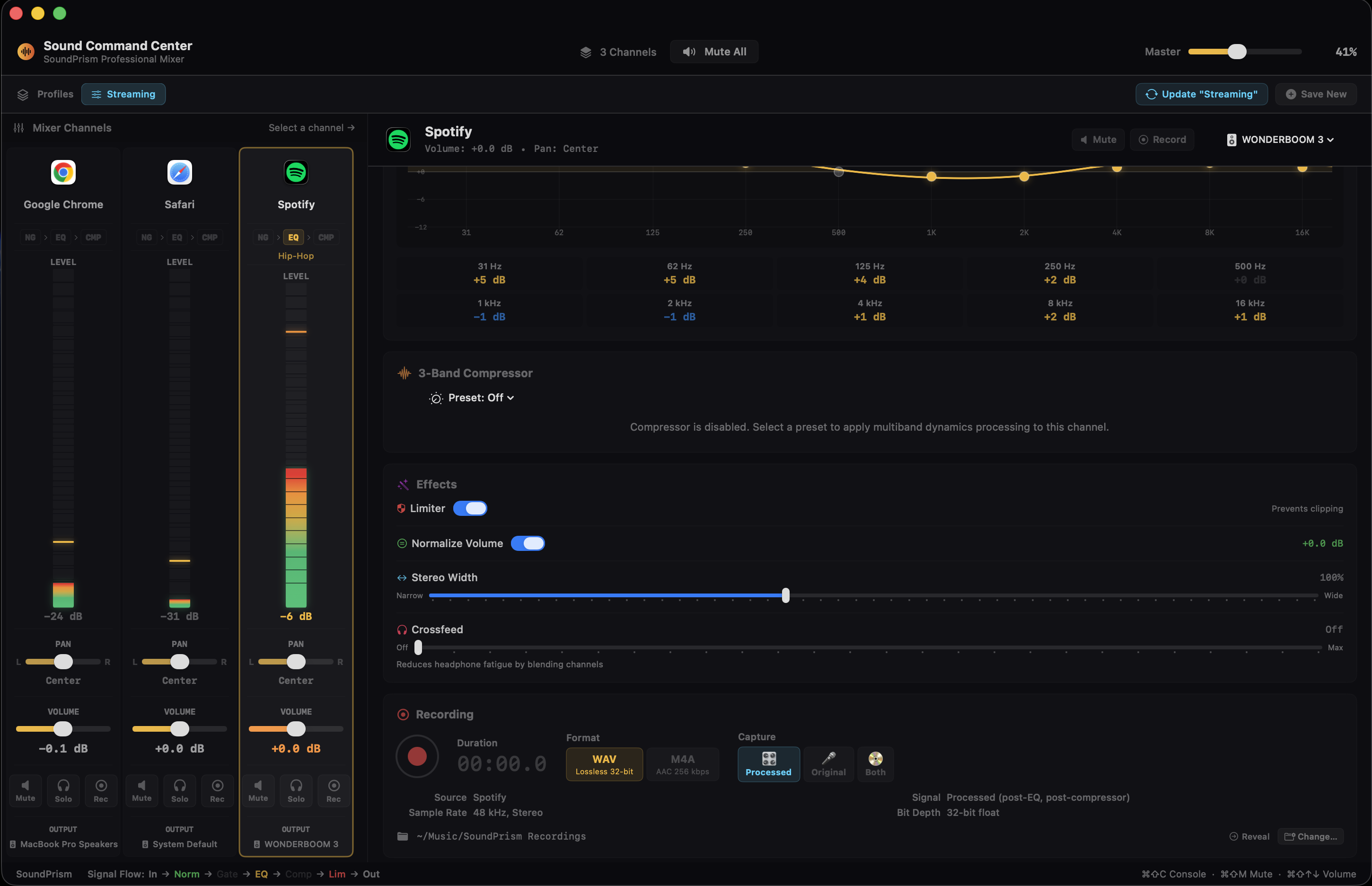
Expand or narrow the stereo image per app. From mono (0%) to ultra-wide (250%). Makes headphone listening more immersive.

Professional stereo processing · zero added latency
🎧

Crossfeed

Headphone crosstalk simulation. Recreates the natural speaker-listening experience in your headphones and reduces fatigue during long listening sessions.

Natural speaker simulation · reduces fatigue · immersive soundstage
Quality of Life
⏺️

Dual-Stream Recording

Record any individual app's audio: both the original (dry) input and the fully processed (wet) output simultaneously. WAV or M4A format.

Glitch-free capture · real-time safe · dual stream
🎛️

Sound Command Center

Full-featured detail panel for each app. Signal flow visualization, 10-band EQ curves, compressor meters, all effects. One key (⌘⇧C) opens everything.

Native macOS Design

Lives in your menu bar. Glassmorphic UI, smooth animations, dark mode, keyboard navigation, global hotkeys. Feels like it shipped with macOS. Because it should have.

A professional
signal chain.

Every app runs through a complete audio processing pipeline: EQ, dynamics, stereo effects, and more. Each effect can be bypassed independently.

🎵
Capture
Capture any app's audio
⚙️
Process
EQ · Dynamics · Stereo · Volume
🔊
Deliver
To any output device

Every effect skips processing when disabled. Zero CPU overhead. Multiple processing stages work together for professional results.

Sound Command Center showing 3 channel strips, 10-band EQ with Electronic preset, and multiband compressor controls
EQ + Compressor — pro signal chain
Sound Command Center showing stereo widener, crossfeed, peak limiter, normalizer, and dual-stream recording panel
Effects + Recording — all in one window

Built different.
On purpose.

Other audio mixers install drivers that sit between your apps and macOS. SoundPrism doesn't. The difference is bigger than you'd think.

1

Built on Native Apple Frameworks

SoundPrism is built entirely on official Apple frameworks designed for audio processing. No third-party libraries, no reverse-engineering, no hacks. Just native macOS APIs doing what they were designed to do.

2

No Drivers. Period.

No kernel extensions, no HAL plugins, no virtual audio devices. Nothing to install, nothing to break on macOS updates, nothing extra cluttering your Audio MIDI Setup.

3

Real-Time Audio Processing

Audio flows through SoundPrism's optimized processing engine: studio-quality effects running at your hardware's native sample rate. ~0 ms added latency.

4

Zero Data Collection

No analytics, no telemetry, no tracking. Your audio and settings never leave your Mac. We don't know what apps you use, what music you listen to, or how you configure your mixer. Other audio tools send usage statistics back to their servers. We send nothing. Read our privacy policy →

Made for how
you actually use your Mac.

Calls, music, games, streams. Every setup is different, and SoundPrism adapts to yours.

🎙️

Podcasters & Streamers

"Record just Discord, not my whole system."

Dual-stream recording captures a guest's raw audio AND your processed mix simultaneously. Isolate individual apps for clean post-production.

🎮

Gamers

"Discord at 30%, game at 100%, Spotify to my headphones."

Independent volume for your game, voice chat, and music. Route each to different devices. The compressor evens out explosive sound effects without touching voice chat.

💼

Remote Workers

"Zoom on speakers, Slack muted, music at 20%."

Tame notification sounds during meetings. Route your call to one device, everything else elsewhere. Normalization keeps quiet speakers audible without manual adjustment.

🎵

Music Lovers & Audiophiles

"EQ my Spotify, widen the stereo, crossfeed my headphones."

Per-app EQ curves, stereo widener for spatial audio, crossfeed for natural headphone listening. Save different profiles for classical, hip-hop, and podcasts.

How SoundPrism
stacks up.

Honest comparison. We only claim what's true.

SoundPrism SoundSource 6 FineTune eqMac Pro
Price $24.99 once $49 once Free $3/mo or $40
Requires Driver No ACE Driver HAL Plugin Virtual Driver
Survives macOS Updates Always Waits for driver update Plugin may break Driver may break
Per-App Volume 0–200% 0–400%
Per-App EQ 10-band 10-band System-only
Multiband Compressor Multiband
Peak Limiter
Volume Normalization
Stereo Widener
Crossfeed
Per-App Recording Dual-stream
Noise Gate Per-app
Output Routing
Architecture Native Frameworks ACE Driver HAL Plugin Virtual Device
Min macOS Sonoma+ 13+ 15.0 (Sequoia) 12+
Collects Analytics None Usage stats with update checks None Feature usage, launches, device info
Website Tracking None Third-party services None Google Analytics
Account Required No No No No

All data verified February 2026. SoundSource is a trademark of Rogue Amoeba. FineTune is open-source software. eqMac is a trademark of Bitgapp.

One price. Yours forever.

No subscriptions, no tiers, no upsells. Every feature, one price.

🚀 Launch Special
$29.99 $ 24 .99

Launch price — pay once, own it forever. Free updates for all v1.x releases.

More built-in features than any Mac audio mixer, at a fraction of the price. No subscriptions, no monthly fees.
  • Per-app volume control (0–200%)
  • 10-band parametric EQ with 8 presets
  • Multiband compressor with 6 presets
  • Peak limiter, normalizer, stereo widener, crossfeed
  • Per-app noise gate with smooth fades
  • Per-app output routing
  • Dual-stream audio recording (WAV + M4A)
  • Quick Config profiles with hotkey activation
  • Sound Command Center
  • Global hotkeys + Siri Shortcuts
  • Launch at login + auto-updates
Download Free Trial

7-day trial · All features unlocked · No credit card

What we stand for.

Four promises we make to every user.

🔒

Your privacy is real

No analytics, no telemetry, no accounts. Your audio stays on your Mac. We chose this because it's what we'd want on our own machines. Read our policy →

💬

We listen

Every email goes directly to the developer. Feature requests, questions, or just saying hi: you're always talking to a real person. Get in touch →

🐛

We fix things fast

Bug reports are taken seriously and prioritized. Check our track record. We ship fixes quickly because we respect your time. See our changelog →

💰

No subscriptions, ever

Pay once, own it forever. All features included, all v1.x updates free. We believe software you bought should stay yours.

Questions?

The important stuff, answered honestly.

What macOS versions are supported?

SoundPrism requires macOS Sonoma or later. It uses native Apple frameworks for audio processing. It runs natively on both Intel and Apple Silicon Macs.

Do I need to install a driver?

Nope! Just drag SoundPrism to your Applications folder and you're set. Most Mac audio tools require installing a system driver or plugin. SoundPrism takes a different approach: it uses native Apple frameworks, so there's nothing extra to install. No kernel extensions, no virtual devices in your Audio MIDI Setup, and no waiting for driver updates after macOS upgrades.

Why does macOS show a purple recording indicator?

That's macOS being transparent about audio access. SoundPrism processes app audio in real time for mixing and effects. macOS treats this similarly to screen recording and shows the purple dot. We never record or store your audio unless you explicitly hit the record button — and even then, recordings are saved locally on your Mac. Your audio is never transmitted anywhere, period.

What audio effects are included?

Every app gets its own independent instance of: 10-band parametric EQ, multiband compressor, peak limiter, volume normalization, stereo widener, crossfeed (headphone simulation), noise gate, stereo balance, and volume control (0–200%). All effects bypass cleanly when disabled, with zero CPU overhead.

How is SoundPrism different from SoundSource?

They solve a similar problem in different ways. SoundPrism uses native Apple frameworks with zero system modifications. No drivers to install or maintain. It also includes a built-in multiband compressor, peak limiter, normalizer, stereo widener, crossfeed, noise gate, and dual-stream recording. SoundSource has strengths of its own, like Audio Unit hosting and grouped outputs. It depends on what matters most to you.

How does SoundPrism compare to FineTune?

FineTune is a solid open-source project, and we respect what they've built. SoundPrism goes further with a full signal chain: multiband compressor, peak limiter, normalizer, stereo widener, crossfeed, noise gate, and per-app recording. SoundPrism also works on macOS Sonoma (FineTune requires Sequoia) and uses a driver-free architecture. If you need more than volume and EQ, SoundPrism is worth a look.

Will it break when I update macOS?

SoundPrism uses a public, documented Apple framework. When macOS updates, the framework keeps working. It's Apple's own infrastructure. We've survived every macOS update since Sonoma with zero issues, because there's no driver to break.

Does it work with pro audio apps like Logic and Ableton?

Yes. Since SoundPrism doesn't install a virtual audio device or HAL plugin, it doesn't interfere with your pro audio chain. Your DAW sees the same real hardware devices it always does.

What's the refund policy?

30-day money-back guarantee, no questions asked. The 7-day free trial gives you plenty of time to test everything first.
SoundPrism
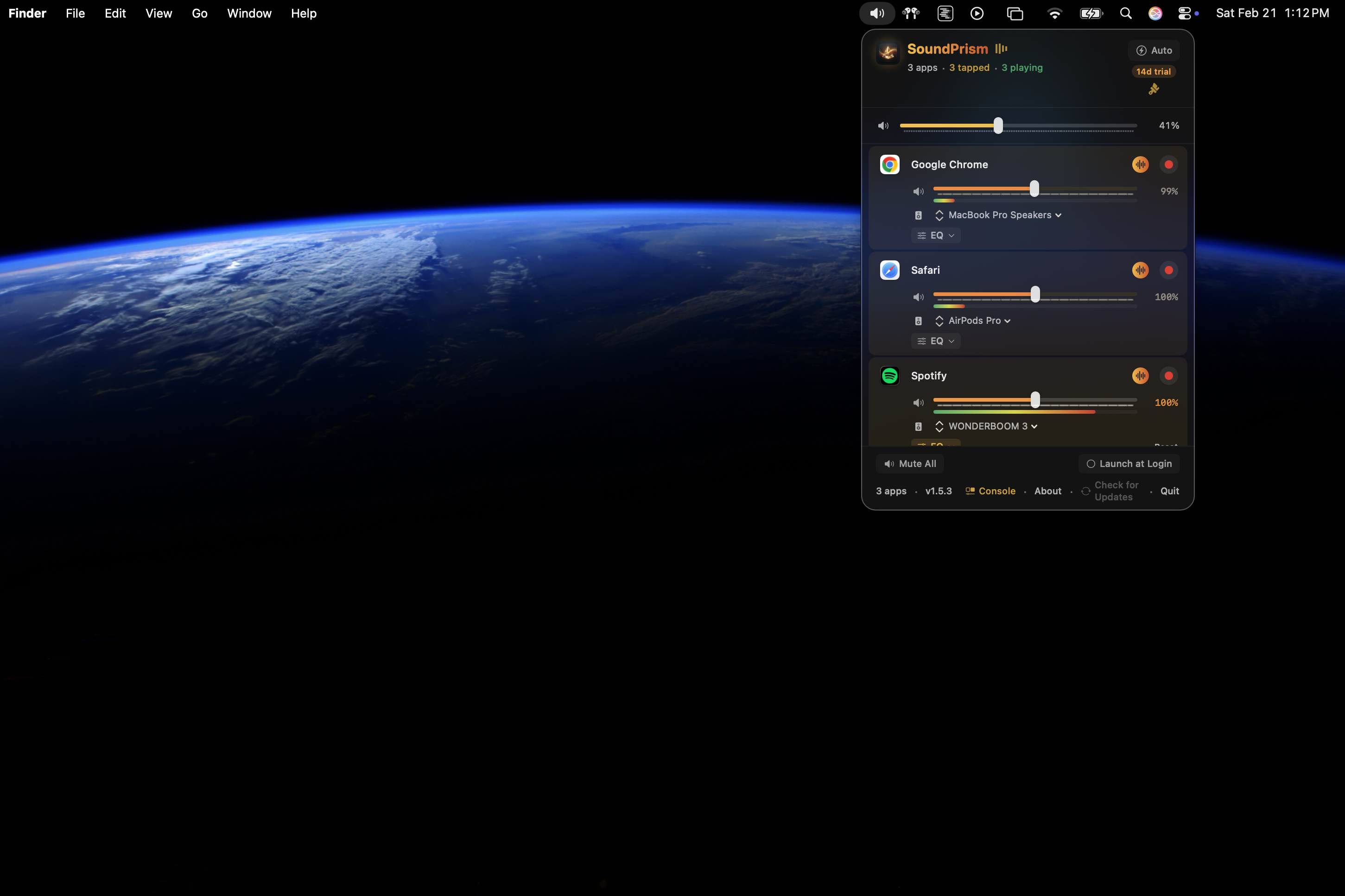
SoundPrism popover open from the macOS menu bar, showing per-app audio controls in context on the desktop

Ready to hear the difference?

Download the free trial. Full features, 7 days, no commitment.

Download SoundPrism

v1.6.2 · macOS Sonoma+ · ~500 KB

Already purchased? Activate in SoundPrism → About → License